This post is a review of the nanoblock Shizuka build. Shizuka is part of the nanoblock Character collection. Wondering what else is part of the Character Collection? Click Here for a list.
Number: NBCC_041
Number of Pieces: 220
Difficulty Rating: 2/5
Shizuka is the main female in the Doraemon series. She is also the main love interest for Nobita. For more information about her and her changes over the years, check out her wiki page here.
This build is made up the 2 parts. There is the head and the body.
The build starts with a base layer of dark pink bricks to make the base of the skirt. The skirt is built up in layers, and eventually, you build the shirt with light pink bricks. I really like the detail of Shizuka holding the violin. Lining up the bricks for the violin was a bit tricky.
After you build the body, you need to build the head. The head begins with a base layer and builds up in layers. As you build the head up, you add the ears, nose, and eyes. Flip it over once you close the head and add the pigtails and mouth. Then you connect the head to the body and finish the build.
Things I liked:
The fact Shizuka is playing the violin
Things I didn’t like:
The bricks used for the skin seem to have an orangish tint
This post is a review of the nanoblock Suneo build. Suneo is part of the nanoblock Character collection. Wondering what else is part of the Character Collection? Click Here for a list.
Number: NBCC_040
Number of Pieces: 200
Difficulty Rating: 2/5
Suneo is one of the main characters in the Doraemon series. He often hangs out with Gian and picks on Nobita. For more information about Suneo, check out his wiki page here.
This build is different from many of the Doraemon builds. This is because it is all built together instead of 2 pieces.
The build begins with a base of golden bricking to create the pants. Layers are then added to make the pants and then the top. Once you finish the shirt, you go directly into building the head.
The head is a bit more complicated by adding bits of bricks to enlarge the head and add details. You will add the eyes, nose, and ears when adding the details. The most dramatic part of this build is the hair. Suneo has hair that sticks out in front of his head, and the build captures the hair nicely while allowing the build to still stand.
Once you have built the head, you need to add the arms and legs. The arms are straightforward, but make sure you are careful when you attach the hands to the arms because if you don’t, the build won’t complete properly. The placement of the finished legs is a bit tricky. If you don’t place them just right the build will tip over.
The final step is to build the little remote control car. It is very straightforward.
Things I liked:
The added detail of the little car
The detail in the hair
Things I didn’t like:
I wish they had used the skin-tone bricks from the Demon Slayer builds. The skin tone is a little orange for my liking.
This post is a review of the nanoblock Gian build. Gian is part of the nanoblock Character collection. Wondering what else is part of the Character Collection? Click Here for a list.
Number: NBCC_039
Number of Pieces: 220
Difficulty Rating: 2/5
Gian is the main antagonist in the Doraemon series. He is a bully that picks on the other kids in the neighborhood, especially Nobita. For more information, check out his wiki page here.
The build is made up of 2 segments: the body and the head.
The first part is building the body. You begin with a layer of navy bricks to make up the legs. You build the body up in layers and rings while adding the outstretched arms. Once you close up the body, you add the details for the hands. This includes Gian holding a microphone in his right hand. The final step of the body is to add the legs and feet to the bottom of the body build.
The second segment of the nanoblock build is the head. Like the body, it because with a layer of bricks. It is built up in rings, basically creating a sphere. As you add the rings, you will add the details of the mouth, ears, and eyes.
Once you finish the head and close up the sphere, you attach it to the body to complete the build.
Things I liked:
The detail of adding the microphone being held in his hand
Things I didn’t like:
The color of the skin tone bricks is very close to the orange so it was a bit difficult to tell which bricks to use while building
This post is a review of the nanoblock Dokodemo Door & Small Light & Take Copter build. Dokodemo Door & Small Light & Take Copter is part of the nanoblock Character collection. Wondering what else is part of the Character Collection? Click Here for a list.
Number: NBCC-038
Number of Pieces: 200
Difficulty Rating: 2/5
The Dokodemo Door (or Anywhere Door in English) is one of Doraemon’s many gadgets. It is one of the most popular and frequently used gadgets in the series. For information check out the Doraemon wiki page.
The main part of the kit is the door. Overall the door needs to be put together very cleanly or else the top of the door won’t attach cleanly. There are also 2 mini builds for the light and copter.
The door begins with creating the base of the door. It is a bit hard to tell how much overhang there should be past the clear bricks with the first layer of pink in the instructions. Next, you build the door frame. The door frame can be tricky because you want all 27 1×1 bricks to line up so that the frame is square.
After building the outside frame, you build the actual door. The door is built in repeating layers of pink bricks. One layer is different because that is where you add the doorknobs. A nice detail is that the knob is on both sides. After building the door you attach it to the frame.
Once you’ve completed the door, you need to add the top of the door. The build is very straightforward. Be careful attaching the top because if you haven’t done the build tightly, the top won’t attach cleanly.
The final step is to do the two mini builds for the Small Light & Take Copter which are quick and straightforward.
Things I liked:
The bonus items are nice
The fact that the door opens and closes
Things I didn’t like:
Getting the sides of the door lined up was tricky
My door is very fragile because the door is a bit taller than the sides
This post is a review of the nanoblock Nobita build. Nobita is part of the nanoblock Character collection. Wondering what else is part of the Character Collection? Click Here for a list.
Number: NBCC_037
Number of Pieces: 190
Difficulty Rating: 2/5
Nobita is the protagonist of the Doraemon series. He is lazy, which really bothers Doraemon. For more information about Nobita, check out the Doraemon wiki page about him here. This is the original nanoblock kit for Nobita and has him standing up like a normal nanoblock build. The second model is one where Nobita lying down on his back.
This build is made of 2 parts the head and the body.
The body is a simple build that begins with a base layer of navy bricks. The layers are added to the base to create the pants. Once the pants are made, you add layers of yellow to create the body. The top of the torso also has the details of a white collar. The final step of the body is to add the arms and legs. When I added the legs, the build became tippy, so it is important to make sure it is stable before adding the head.
The second part of the build is to build the head. It begins with a base of skin tone and black bricks. You then build up the head in layers creating Nobita’s glasses and eyes along with the rest of the head. Once you closed up the head, you add the mouth and the neck. The final step of the main build is to attach the head to the body.
This build, like several of the Doraemon builds, has a miniature build. This build comes with take-copter which attaches to Nobita’s head. There is also a take-copter with the Dokodemo Door build.
Things I liked:
The details of the glasses and the copter in the build
Things I didn’t like:
The feet aren’t super stable, so the build doesn’t still flat if you aren’t careful.
This post is a review of the nanoblock Doraemon build. Doraemon is part of the nanoblock Character collection. Wondering what else is part of the Character Collection? Click Here for a list.
Number: NBCC_036
Number of Pieces: 270
Difficulty Rating: 3/5
This is the second version of Doraemon I have built. The other is the sitting version which you can read the review here.
This build is broken up into the body and the head. There is also a mini build for the cream doughnut.
You begin this nanoblock build by building the body. The body is a pretty straightforward build that goes up in layers. I was worried about the second layer because the ring of bricks on the outside of the build wasn’t complete so I was worried there would be a gap. As layers are added to the body, details like the hands, bell, tail and collar are all added. Once you have built the main segment of the body, you add the feet. I was pleasantly surprised that the legs covered the gap created in layer 2.
Once the body is built, it’s time to make the head. You begin the head by building 2 pieces for the front and back of the head. These pieces are combined to create the first few layers of the head. You add on layers by adding to the outer ring of the head. Be careful adding the layers just over the mouth because they stick out and aren’t flush. Keep adding layers with the rings getting smaller. There is an odd step to add the bricks that become the space between the eyes, but it looks a little funny while building the head layer. Once you have closed up the head, it’s time to add the final details of the eyes, nose, and whiskers.
The final step is to build to connect the head to the body. There is also a mini build that is very straightforward to make your Doraemon a sweet treat.
Things I liked:
The fact that the gap was filled in, so I didn’t need to figure out how to fill the gap
The number of details that create Doraemon
Things I didn’t like:
There is a gap in the eyes that I don’t really like, and I feel is noticeable
I feel like the feet are blocky and aren’t rounded like Doraemon’s actual feet
This post is a review of the nanoblock Nobita build. Nobita is part of the nanoblock Character collection. Wondering what else is part of the Character Collection? Click Here for a list.
Number: NBCC_075
Number of Pieces: 220
Difficulty Rating: 3/5
Nobita is the protagonist of the Doraemon series. He is lazy, which really bothers Doraemon. For more information about Nobita, check out the Doraemon wiki page about him here. This is the second nanoblock kit for Nobita and has him lying down instead of standing up like a normal nanoblock build.
This is an unusual build because instead of the final model standing, the final build is lying down on his back. This is created using the bricks that I call the steps. They are the bricks that are 1×2, but one stud is a brick higher with a slanted connection.
This nanoblock build is made up of the body, the head, and a little pillow.
The body begins by building a base layer. It begins using step bricks to create Nobita’s back. You make the body in layers. You eventually add the leg that crosses over the body. You keep adding onto the body with each layer, adding a step brick to create Nobita’s back that finished build will lie on. The body ends with completing the arms that go around the back of the head.
The other major piece of the build is the head. Like the body, the head is built in layers. The head is very straightforward. There are nice details to create the mouth and glasses. I also like how the eyes are a little inset which adds to the various details of the build.
The final build is a pillow for Nobita to lie on. It is simply a stack of rounded blue bricks that you curl around to make a triangular pillow.
Things I liked:
The positioning of Nobita is very unique for the nanoblock characters
Things I didn’t like:
That the navy and the black bricks were in the same bag
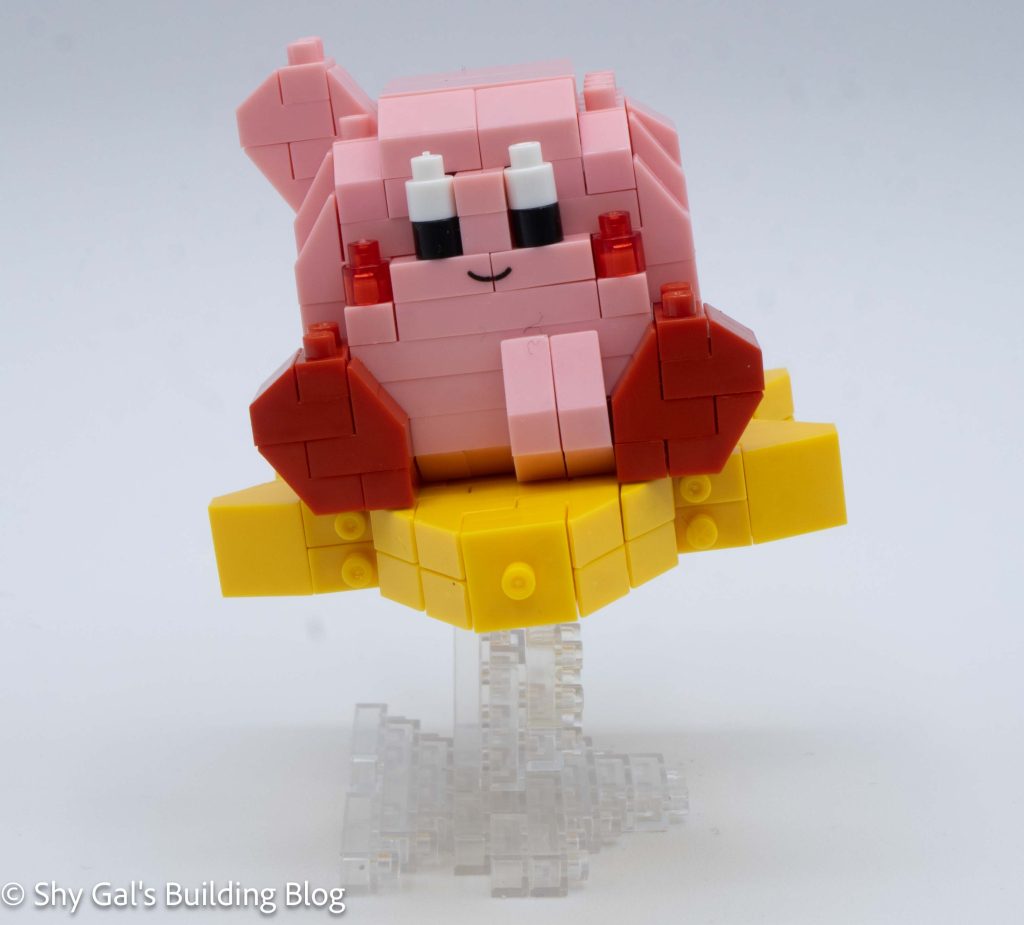
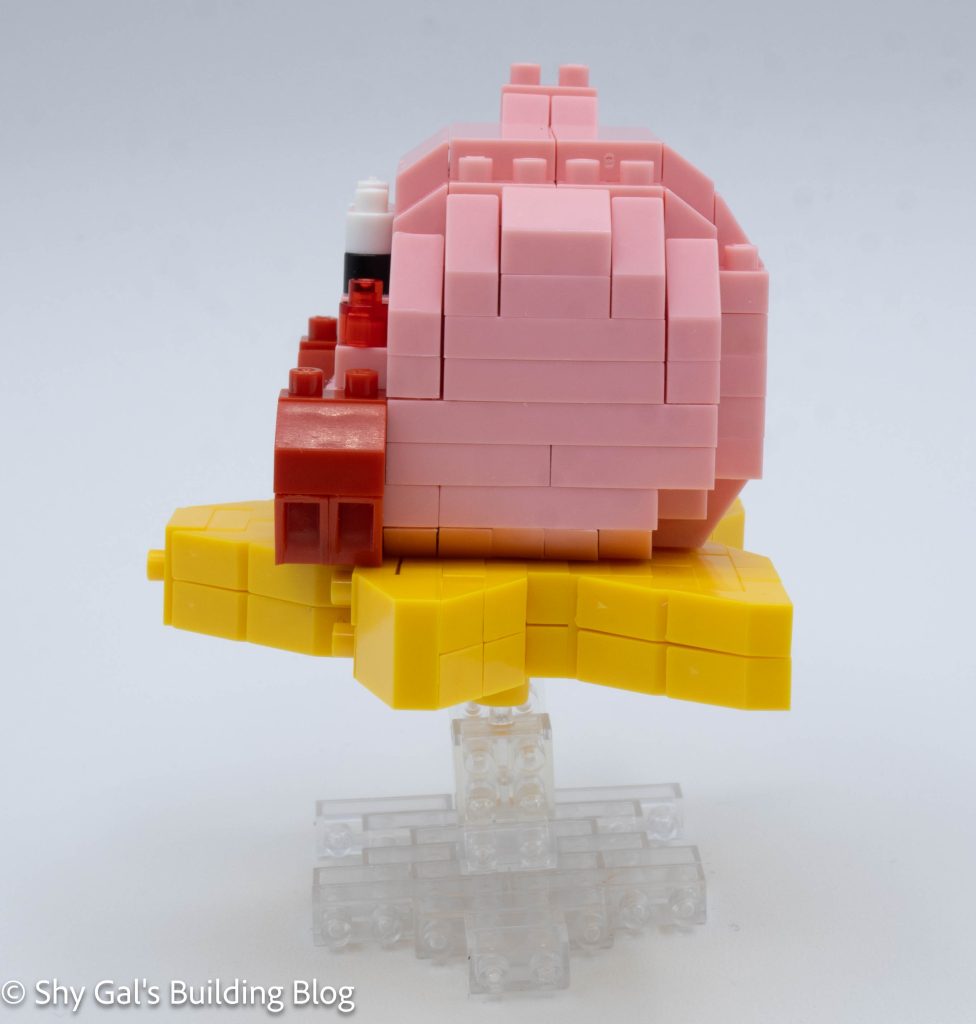
This post is a review of the nanoblock Kirby 30th build. Kirby is part of the nanoblock Character collection. Wondering what else is part of the Character collection? Click here for a list.
Number: NBCC_140
Number of Pieces: 220
Difficulty Rating: 2/5
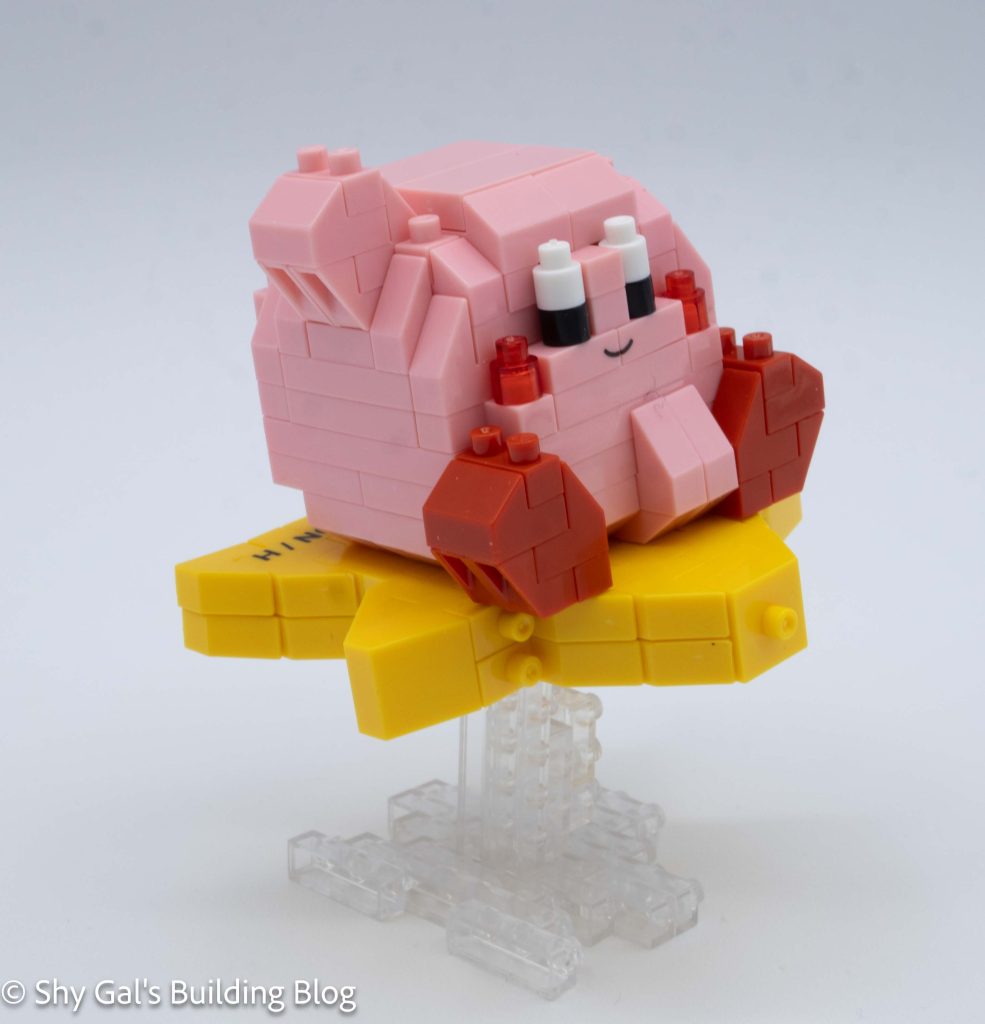
This build is made up of 3 sections. There is Kirby, the star, and the stand.
Kirby begins by making a base in pink bricks. Then the feet are added to the base. After that, Kirby begins going up in layers. Overall, things are fairly straightforward. In the step that adds Kirby’s mouth, I didn’t understand from the instructions that there was a custom piece with the mouth printed. Once I found the piece, the only other concern was the slanted pieces.
Kirby has 2 different slanted pieces. I appreciated that the colors in the instructions were different enough that it was very clear when to use which slanted piece.
The final step to building Kirby is to finish his hand and smooth out the top of his head.
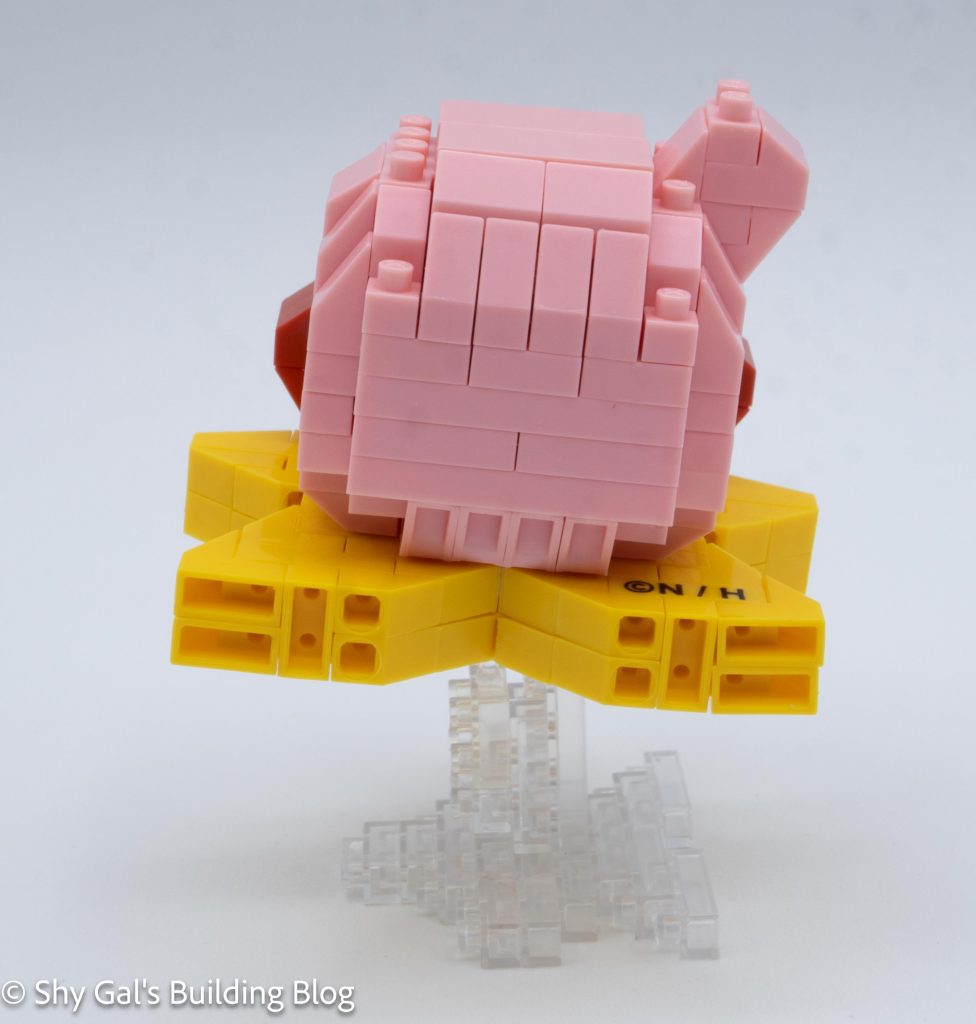
Kirby comes with a big 30th sticker to put on his back. I didn’t use the sticker on this build because it would have meant that I wouldn’t be able to take Kirby apart.
The star is created by several layers of yellow bricks with a width of 2, so the final build is 2 bricks tall. The first step creates a gap in the 2 depth. I wasn’t sure why there was a gap, but it became clear when I put the sections together. The second step adds the socket of the ball joint, which is needed to connect the star to the stand.
After adding the socket, the rest of the star is fairly straightforward until the final step. There are 2 notable things about the final step. First, there is a custom-printed brick. I think it is for copyright, but I’m not sure for what exactly. Secondly, it wasn’t clear that it mattered what order sections were added. It was pretty easy to fix when I realized the order did matter.
Kirby sits on studs that point out the star, so he is very stable.
The stand is fairly straightforward. It begins by building up several layers of clear bricks. After building the layers, some additional bricks are added to the bottom layer. The stand is then laid on its side so the ball joint is up in the air.
Kirby’s star attaches to the ball joint on the stand. The part sticking up above the joint goes into the hole in the star to all the star to sit at an angle.
Things I liked:
The custom brick for Kirby’s mouth because it means there isn’t a sticker for the mouth
How Kirby sits at an angle on his star ride
Things I didn’t like:
It was really hard to tell about the special brick that had Kirby’s mouth was a special brick
This post is a review of the nanoblock Ashuraman build. Ashuraman is part of the nanoblock Character collection. Wondering what else is part of the Character collection? Click here for a list.
Number: NBCC_131
Number of Pieces: 260
Difficulty Rating: 3/5
Ashuraman is a character in the Kinnikuman series. He is based on the Hindu god Ashura and has 3 faces. For more information about him, check out his fandom wiki page here.
Since Ashuraman has 3 faces, building the head is very different from any of the other Kinnikuman figures.
The build begins by creating the center section of the head that divides the 3 faces.
The next section is building the front face. This head is very straightforward and adds the mouth and eyes to the build.
The next several sections is to build Ashuraman’s crown. It takes several steps to build the outline of the crown. After building the outline, the crown goes up in layers with details around the edge. After building the crown, the crown is connected to the main face piece.
The next collection of steps is building the rest of the head. This includes building the 2 other faces in orange and blue and connecting them in the ball joints. There is also some decorative framing around the main face.
Now it is time to start the body. There are a few layers of maroon and skin tone that create the core of the body. This section is fragile and didn’t really get more solid as I added more bricks.
Then 6 arms are added to the build. After adding the arms, the top of the body is topped off, and the bricks to attach the head are added.
The legs and feet are added. Compared to the rest of the build, adding the feet is very straightforward.
Next, each of the arms receives a hand. They are only tricky to ensure the thumbs are in the right place.
The final step of the build is to add the head onto the body section.
Things I liked:
I enjoyed building the head because it was so unique
Things I didn’t like:
The body never got super stable while I was building it up. It was frustrating to be building on such a flexible part.
Based on his wiki page, he is supposed to be blue. It would have been cool if he had been blue instead of skin tone.
This post is a review of the nanoblock Terryman build. Terryman is part of the nanoblock Character collection. Wondering what else is part of the Character collection? Click here for a list.
Number: NBCC_130
Number of Pieces: 180
Difficulty Rating: 2/5
Terryman is a character in the Kinnikuman series. He is the best friend of Kinnikuman. For more information about him, check out his fandom wiki page here.
The head begins by creating a staggered base layer. This means you can’t build the head on the nanoblock pad. These staggered layers create the mouth, the center of the head, and the base of his hair. However, all the steps for building the head are fairly straightforward.
The head then goes up in layers adding the nose, eyes, and more hair. The Chinese character custom brick is also added to the head. (I really like that the brick is custom and doesn’t require a sticker.
After completing the face, the final step of the head is to complete the hair.
After completing the head, it is time to body. The body is a straightforward 4 layers of bricks.
The next step is to create the hips, legs, and feet. The hips are fairly straightforward. When I attached the thighs to the hip, I had difficulty getting things lined up when I tried to attach the arms. The lower legs and feet are also straightforward.
Then the head is attached to the body. I had a hard time getting the head lined up properly and attached. This means the head isn’t at the angle it is supposed to be.
The final step is to build the arms. The arms also have a custom-printed brick, but it is a little hard to see the printing due to how light the printing is. The arms are fairly straightforward and easy to complete. Once the arms are built, they are added to the body. When I attached one of the arms, I needed to move one of the legs for all the body parts to be attached.
Overall the build is pretty straightforward, but many angles in my finished model don’t match the photos.
Things I liked:
I really like the custom-printed bricks and apricate that stickers were not required
Things I didn’t like:
When I was building, things just in general didn’t line up to match the picture, which is annoying